
QR Code Generator Online – Create Custom QR Codes Instantly
Use our free QR Code Generator to create beautiful codes for your website, Wi-Fi, business cards, and more.
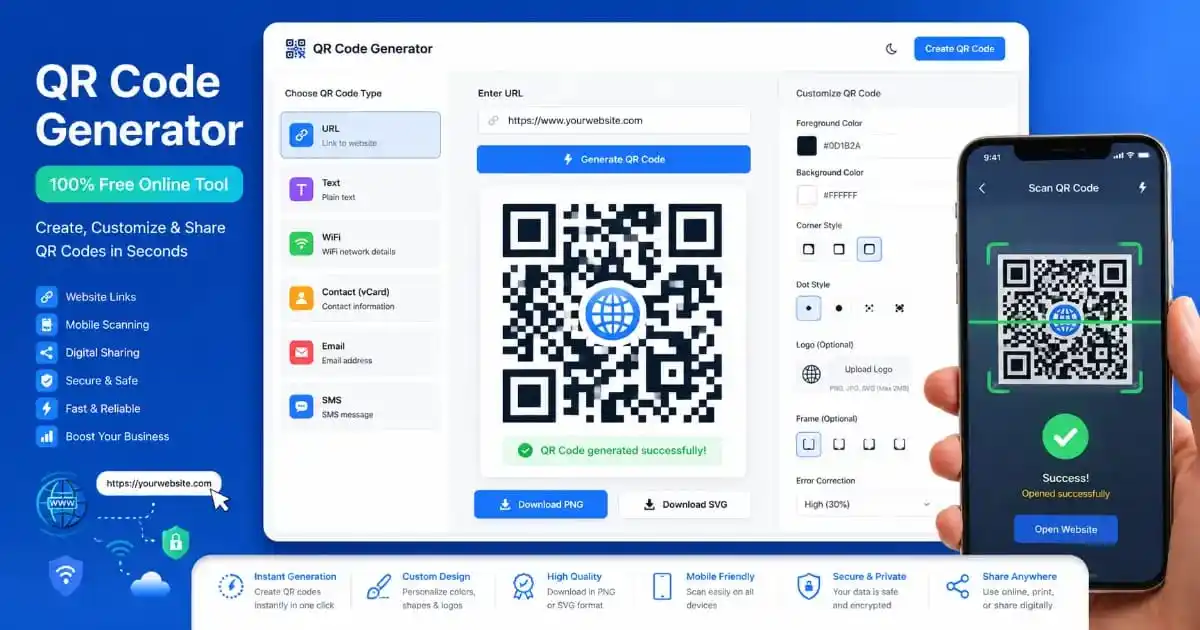
Welcome to the most simple and user-friendly QR Code Generator on the internet. In today’s fast world, sharing information quickly is very important. Whether you want to send someone to your website, share your Wi-Fi password without typing it, or give your phone number to a new friend, a QR code is the best way to do it. Our tool is made for beginners, so you do not need any technical skills to use it.
What is a QR Code?
A QR code, which means “Quick Response” code, is a black and white square pattern. It works like a barcode but is much better. While a traditional barcode can only hold a little bit of information in a line, a QR code can hold a lot of data in a square shape. When you scan it with your phone camera, it immediately opens a link or shows information. By using our QR Code Generator, you can make these squares for anything you like.
QR codes were first made in Japan for the car industry, but now they are used everywhere in the world. You see them on restaurant menus, food packets, and even on big posters in the street. They are helpful because people do not have to type long web addresses on their small phone screens. They just point the camera and click!
Features of our QR Code Generator
We have built this QR Code Generator with many helpful features to make your life easy. Here are some of the best parts of our tool:
- Multiple Data Types: You can create codes for websites, simple text, Wi-Fi networks, and even digital business cards.
- High Resolution: Every code you make is clear and easy to scan, even on small papers.
- Instant Preview: As soon as you type your information, you can see how your QR code looks.
- Download Options: You can save your image as a PNG for social media or an SVG for professional printing.
- 100% Free: There are no hidden costs. You can make as many codes as you want for free.
How to Use our QR Code Generator Step-by-Step
Using our QR Code Generator is as easy as 1-2-3. Just follow these simple steps for beginners:
- Choose your type: First, look at the dropdown menu. Decide if you want to make a code for a website URL, a Wi-Fi password, or just some text.
- Enter your details: Type the link or the text in the box. If it is for Wi-Fi, type your network name and password carefully.
- Click Generate: Press the big button that says “Generate QR Code”. You will see the square pattern appear on the right side.
- Download and Save: Click on the PNG or SVG button to save the file to your computer or phone. You can also click “Copy Image” to paste it somewhere else.
Remember, if you have a long website link, it is often better to use a URL Shortener first. This makes the QR code look cleaner and scan faster because it has less data to hold.
Why Your Business Needs a QR Code Generator
If you have a shop, a cafe, or a small business, using a QR Code Generator can help you get more customers. Instead of giving people a paper menu that many people touch, you can put a QR code on the table. When customers scan it, they can see the menu on their own phones. This is clean, safe, and modern.
You can also use QR codes on your business cards. Instead of people having to type your name and number into their phone, they can scan the code and save your contact details instantly. To make your cards look even more professional, you might want to look at our Barcode Generator for product tracking or our Password Generator to keep your digital files safe.
The Benefits of Using QR Codes
There are many reasons why people love using the QR Code Generator tool. Here are the top benefits:
- Time Saving: No more typing! Just one scan and you are done.
- Zero Errors: When people type a URL, they often make mistakes. QR codes never make mistakes.
- Modern Look: Adding a QR code to your flyers or posters makes you look like a tech-savvy person.
- Environment Friendly: You can save paper by putting information inside a digital code instead of printing big booklets.
Safety and Privacy
Many people ask if using a QR Code Generator is safe. Yes, it is very safe! Our tool works entirely in your browser. This means your information is not sent to our servers. When you enter a Wi-Fi password or a private message, only you can see it. We care about your privacy.
However, always be careful when scanning codes in public places from people you do not know. Just like you should not click on strange links in emails, you should only scan QR codes from trusted sources. For developers and tech users, we also offer an Image to Base64 converter which is great for embedding images safely in code.
Creative Ways to Use QR Codes
Don’t just stick to websites! Use our QR Code Generator in creative ways. For example, you can put a QR code on a birthday card that leads to a secret video message. Teachers can put codes on classroom walls that lead students to helpful educational videos. The possibilities are endless when you have a free tool at your fingertips.
If you are a photographer, you can use a QR code to lead people to your portfolio. If you are worried about the background of your profile picture on your portfolio, you can use our Background Remover to clean it up before making your QR code. Also, if you need to hide some parts of an image, try our Blur Censor Image tool.
Comparing QR Codes to Other Tools
While a QR Code Generator is amazing, sometimes you need other tools. For instance, if you are shipping boxes, a barcode is better. If you are making a website, you might need an Image Compressor to make your site load fast. If you want to find the perfect colors for your QR code design, use our Image Color Picker or our Color Palette Generator to find beautiful matching shades.
Helpful Scanning Tips
To make sure the code you make with our QR Code Generator works perfectly, follow these tips:
- Contrast: Always use dark colors for the code and light colors for the background. Black on white is the best.
- Size: Do not make the code too small. It should be at least 2cm x 2cm for easy scanning.
- Lighting: When scanning, make sure there is enough light so the camera can see the pattern clearly.
- Clear Area: Leave some empty white space around the QR code so the scanner knows where it starts.
For more technical details on how QR technology is standardized, you can visit the W3C website or check the official QR Code website for the history of the invention. Even Google has great documentation on charting QR data.
Advanced Strategies for QR Code Implementation
As digital connectivity becomes more integrated into our daily lives, understanding the nuances of QR technology is essential for anyone looking to bridge the gap between physical media and digital platforms. While the primary function of a QR creation tool is to encode data, the strategic thinking behind how that data is presented can determine the success of a campaign. One of the most important distinctions to understand is the difference between static and dynamic codes. Static codes, which are the standard output for most free online utilities, contain the actual data directly within the pattern. This means they are permanent and cannot be changed once printed. They are ideal for Wi-Fi passwords, contact details, and permanent website links.
Static vs. Dynamic: Making the Right Choice
Static codes are highly reliable because they do not require a middle-man server to function. However, if you are running a marketing campaign where the destination URL might change in the future, you must ensure that your initial link is either permanent or managed through a redirect service. For small business owners and educators, static codes offer a cost-effective and simple solution for distributing information without worrying about monthly subscriptions or link expiration. This makes the custom QR maker an indispensable asset for local community projects and small-scale events.
Design Ethics and Visual Branding
While the classic black-and-white square is universally recognized, modern design allows for significant creative freedom. However, with this freedom comes the responsibility of maintaining “scannability.” A common mistake is adding too much detail or reducing the contrast to a point where older smartphone cameras struggle to recognize the patterns. When you use a digital code creator, always prioritize high-contrast color palettes. Darker shades for the foreground and lighter shades for the background are the industry standard. Furthermore, maintaining a “quiet zone”—a small border of empty space around the code—is crucial for the scanning software to isolate the code from surrounding graphics or text on a flyer or poster.
Marketing and User Engagement
To maximize engagement, a QR code should never stand alone. It should always be accompanied by a clear “Call to Action” (CTA). For example, instead of just placing a code on a window, add text like “Scan for Today’s Special Menu” or “Scan to Join our VIP Newsletter.” This tells the user exactly what value they will receive by taking the time to open their camera app. Placement is also key; codes should be placed at eye level and in areas where people have a few moments to stop, such as bus stops, waiting rooms, or checkout counters. Avoid placing codes on moving vehicles or high-speed areas where scanning would be dangerous or physically impossible.
The Future of Scannable Technology
The evolution of scannable data is moving toward even more integration with Augmented Reality (AR). In the near future, scanning a code might not just open a website but could launch a 3D model of a product or a virtual tour of a property. By mastering the basics of code generation today, you are preparing your brand for the immersive digital experiences of tomorrow. The simplicity and efficiency of this technology ensure that it will remain a cornerstone of global communication for decades to come, providing a seamless link between our physical environment and the vast world of online information.
QR Code Generator FAQ
Conclusion
In conclusion, a QR Code Generator is an essential tool for everyone in the modern digital age. It connects the physical world with the online world in just one second. We hope this beginner-friendly guide has helped you understand how to create your own codes easily. Whether for personal use or for growing your business, start using our 100% free tool today. Thank you for choosing PixaPDF Tools for all your digital utility needs!