
PowerPoint to PDF
Upload, preview, convert, download — free.
Click to upload or drag and drop
.PPTX only — max 40MB
PowerPoint to PDF converter is a specialized digital utility that allows you to transform Microsoft PowerPoint presentations (.ppt or .pptx) into Portable Document Format (.pdf) files. Presentations are vital for sharing ideas, but they can often look different on different devices due to missing fonts or software versions. By using a professional converter, you ensure that every slide looks exactly as intended, regardless of where it is viewed.
The need for reliable file transformation is growing in our digital-first world. Whether you are a student submitting a project or a business executive presenting a pitch, the visual consistency provided by our tool is unmatched. Our platform focuses on delivering pixel-perfect results while maintaining the smallest possible file sizes.
In addition to presentations, we offer other essential tools like our Word to PDF converter and Excel to PDF tools. These utilities form a comprehensive suite that simplifies document management for everyone. By moving to PDF, you lock your content against accidental edits, making it safer for distribution across email and cloud platforms.
PowerPoint to PDF converter: Maintaining Highest Fidelity
PowerPoint to PDF converter technology has evolved significantly to handle modern design elements. Modern presentations often include complex SVG graphics, semi-transparent layers, and sophisticated typography. Our engine ensures that every vector remains a vector, preventing the “blurry” look often associated with low-quality converters. When you use a high-end PowerPoint to PDF converter, the internal mathematical descriptions of shapes are preserved, allowing readers to zoom in up to 400% without seeing a single pixel.
PowerPoint to PDF converter utilities must also manage the relationship between light and dark themes. With many users switching to “Dark Mode,” a PDF that preserves the exact color hex codes of your PPTX branding is crucial. Our tool uses a color-calibration profile that ensures RGB values from Microsoft Office are mapped correctly to the PDF standard. This makes your charts and tables pop just as much in the document as they did on the big screen during your live presentation.
What is a PowerPoint to PDF converter?
A PowerPoint to PDF converter is an application designed to interpret the complex layers of a slide deck and render them into a static, high-fidelity document. This process involves flattening animations, embedding fonts, and compressing high-resolution images so that the final document is both portable and professional. Unlike standard “Save As” functions in some software, a dedicated online converter often provides better compression and compatibility.
The Portable Document Format (PDF) was created to be a universal standard. When you use a converter, you are essentially translating Microsoft’s proprietary slide language into an open standard supported by every browser and operating system in existence today. This is crucial for accessibility and long-term archiving.
You might also find that you need to combine these files later. In such cases, our Merge PDF tool works perfectly alongside the converter to create a single, unified document from multiple presentation sources.
Why use our PowerPoint to PDF converter?
Our PowerPoint to PDF converter is built with speed and security at its core. Most users choose online tools because they don’t want to install heavy software on their laptops or mobile devices. Our browser-based solution provides the same quality as desktop applications but with the convenience of 1-click access from any location.
Privacy is another major factor. We understand that your presentations often contain sensitive data. That is why our converter uses end-to-end encryption. Once the conversion is finished and you download your file, our servers automatically clear the temporary data to ensure your information remains confidential.
Furthermore, if your final PDF is too large for an email attachment, you can quickly use our PDF Compressor to reduce the footprint without losing slide clarity. This integrated workflow makes us a favorite among high-volume document users.
PowerPoint to PDF converter: Transforming Mobile Productivity
PowerPoint to PDF converter access on smartphones has become a necessity for the modern traveler. Imagine you are at the airport and a colleague sends a last-minute slide update. Opening a large .pptx file on a phone can be sluggish and the formatting is often broken. By using our mobile-optimized PowerPoint to PDF converter, you can transform that file into a stable PDF in seconds. This allows you to review the slides with 100% layout accuracy directly in your browser or any lightweight PDF viewer.
PowerPoint to PDF converter cloud integration also streamlines the “Share” culture. Once your presentation is in PDF format, it is much easier to send via WhatsApp, Slack, or Telegram. Unlike PPTX files, which might be blocked by some corporate firewalls due to macro security concerns, a PDF is widely accepted as a safe, non-executable file format. This makes the PowerPoint to PDF converter an essential tool for secure and efficient remote communication.
Key Features of the PowerPoint to PDF converter
The most advanced PowerPoint to PDF converter features include high-fidelity rendering. This means that if you have used custom gradients, transparent shapes, or complex SmartArt, our engine will reproduce them accurately. Many free tools fail to capture these nuances, leading to broken layouts or missing graphics.
Batch processing is another highlight. Instead of converting slides one by one, you can upload multiple presentations at once. The tool handles the queue efficiently, allowing you to download a zip file or individual PDFs in seconds. This saves hours of manual labor for administrative tasks.
Our tool also ensures that hyperlinks within your slides remain active in the PDF version. This is essential for portfolios or sales decks where you want the reader to click through to your website or contact page. If you ever need to turn things back, our PDF to Word tool is always available for editing needs.
Step-by-Step Guide for the PowerPoint to PDF converter
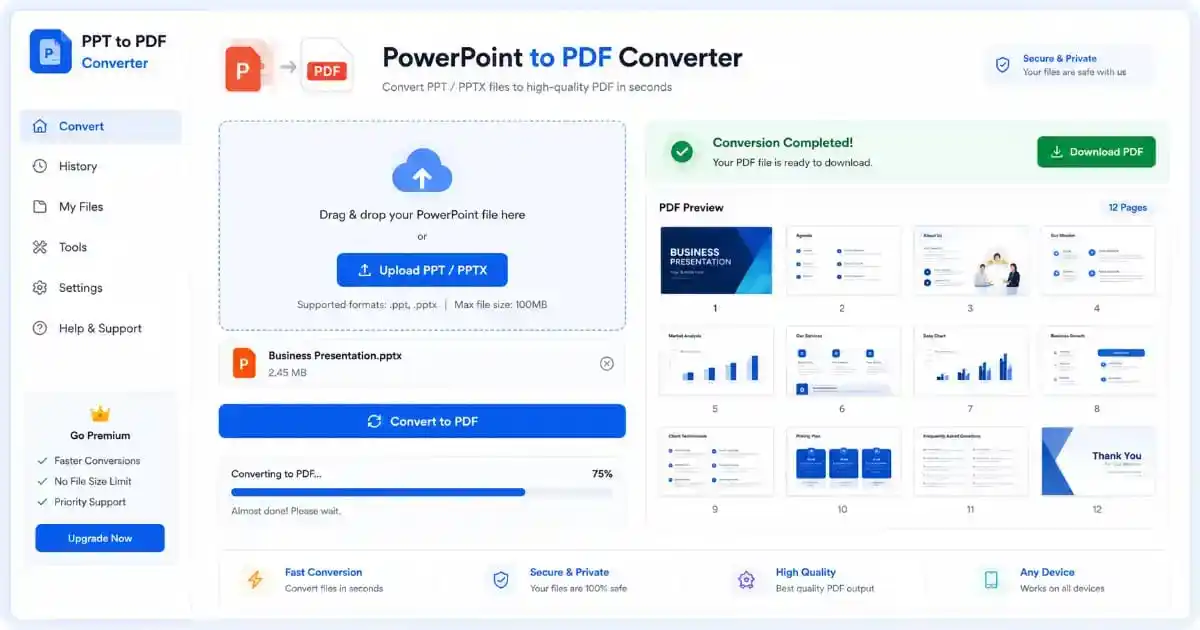
Using our PowerPoint to PDF converter is extremely simple. First, navigate to the top of this page and locate the upload area. You can either drag your .pptx files directly into the box or click the “browse” link to select them from your file explorer. Once the file is selected, our system will show you the file name and size for verification.
Next, click the “Convert” button. You will see a progress bar that indicates the status of the conversion. Depending on the size of your presentation and the number of images, this usually takes between 3 to 10 seconds. We use high-speed cloud clusters to ensure minimal waiting times for our users.
Finally, click the “Download” button to save your new PDF. If your document requires page numbers for a formal report, you can jump over to our Add Page Numbers tool immediately after conversion. For those working with web-based content, don’t forget our HTML to PDF converter as well.
PowerPoint to PDF converter: A Lifeline for Modern Education
PowerPoint to PDF converter usage in the academic sector has tripled over the last few years. Students today rely heavily on digital tablets like iPads and Android slates for taking notes. However, writing directly onto a PowerPoint slide is often clunky. By running lecture slides through a PowerPoint to PDF converter, students can use apps like GoodNotes or Notability to annotate, highlight, and draw directly over the teacher’s content. This bridge between presentation and study material is vital for effective learning.
PowerPoint to PDF converter technology also aids professors in archiving. When a semester ends, keeping thousands of PPTX files can take up significant server space. A PDF version is often 50% smaller and ensures that the material remains readable decades later, regardless of whether Microsoft PowerPoint still exists or has changed its file format. This archival stability is why every educational institution recommends a PowerPoint to PDF converter for final project submissions.
The Major Benefits for Professionals
Why do millions of people rely on a PowerPoint to PDF converter daily? The primary benefit is cross-platform compatibility. A PowerPoint file requires specific software to open, but a PDF can be viewed on a smart fridge, a Kindle, or an old smartphone. This universality is the key to effective communication in a globalized economy.
Security is the second benefit. While you can password-protect a PPT, a PDF offers more robust permission settings. You can prevent people from copying text or printing the slides. For maximum security, always use a Protect PDF tool to encrypt your finished files with AES-256 standards.
Lastly, file size management is superior in PDF formats. PowerPoint files often bloat because they store “undo” history and hidden metadata. A PDF is a “clean” version that only contains what is necessary for viewing. This makes it ideal for uploading to LinkedIn, SlideShare, or your personal portfolio website.
Common Use Cases for a PowerPoint to PDF converter
In the academic world, the PowerPoint to PDF converter is a lifesaver. Professors often share lecture slides in PPT format, but students prefer PDF for note-taking on tablets using styluses. Converting these files allows students to annotate, highlight, and search for keywords effortlessly during exam preparation.
For business owners, converting pitch decks is a standard practice. You never want to send a PPT file to a potential investor because they might accidentally move a text box or see your private speaker notes. A PDF ensures a polished, “locked” version of your vision is what they see. If you need to separate a large deck into individual slides, our Split PDF tool is the perfect companion.
Marketing teams use these converters to create “Lead Magnets.” You can design a beautiful presentation and convert it into a downloadable eBook. To keep it clean, you might need to use our Remove Watermark tool if you are repurposing older branded assets for a new campaign.
Technical Details of Presentation Conversion
Our PowerPoint to PDF converter uses advanced parsing logic. Most people don’t realize that a .pptx file is actually a compressed XML archive. Inside, there are folders for media, themes, and slide layouts. Our converter opens this archive, reads the XML instructions, and translates them into PostScript commands that form the PDF.
Color accuracy is a significant challenge in this field. Computers use different color profiles (like RGB and CMYK). Our tool is calibrated to maintain RGB vibrancy for screen viewing while ensuring that colors won’t look “muddy” if the user decides to print the PDF. This level of detail is why we are considered a leading file conversion service.
Font embedding is another critical technical step. If you use a rare font, our engine embeds the glyph data directly into the PDF. This prevents the “missing font” error that often ruins presentations. We recommend visiting Adobe’s PDF standard page to learn more about how these technologies work together to preserve document integrity.
PowerPoint to PDF converter: Optimized for Hard Copy Printing
PowerPoint to PDF converter workflows are essential when preparing material for physical printing. If you try to print directly from PowerPoint, you may encounter issues with “print safe” margins or overlapping text. Our PowerPoint to PDF converter automatically handles the bleed and margin calculations, ensuring that your slides fit perfectly on A4 or Letter-sized paper. This is especially useful for handouts at conferences or hard-copy brochures designed in a presentation format.
PowerPoint to PDF converter engines also manage image resolution during the printing process. While a screen only needs 72 DPI (dots per inch), a high-quality printer requires 300 DPI. Our tool analyzes the source images in your PPTX and maintains the highest possible resolution to ensure that your printed charts are sharp and legible. By using a PowerPoint to PDF converter, you are essentially creating a digital master copy that is ready for any industrial-grade printing press.
Maximizing Presentation Impact
When using a PowerPoint to PDF converter, you should also consider the layout of your slides. Since PDFs don’t support transitions (like fades or wipes), you should ensure that your information is not hidden behind “click-to-reveal” animations. If you have such animations, it is best to create duplicate slides for each “state” before converting.
Furthermore, image resolution matters. If your PPT file has 4K images, the resulting PDF will be massive. While our tool can handle this, it is often better to optimize images before conversion. You can find excellent tips on Microsoft Office Support regarding how to manage presentation assets efficiently.
Accessibility is not just a buzzword; it’s a legal requirement for many organizations. A PDF created by our tool is tagged for screen readers, ensuring that visually impaired users can still consume your presentation content. This makes your work compliant with global standards like the WCAG.
Optimizing for Cloud Workflows
In the age of remote work, the PowerPoint to PDF converter has become an essential part of the cloud stack. Teams working on Google Drive or Microsoft OneDrive often need to share “milestone” documents. PDFs are the perfect snapshot of a project’s progress. They are easy to preview in Slack or Microsoft Teams without opening the full PowerPoint application.
Mobile productivity is also enhanced. If you are on a train and need to review a deck sent by a colleague, opening a PPT file can be slow and buggy on a phone. A PDF, however, opens instantly in any mobile PDF viewer. Our tool is optimized for mobile browsers, meaning you can convert and share files while on the go.
For those interested in web development and file standards, checking resources on W3C PDF Standards can provide deeper insight into how documents are handled on the open web. Understanding these protocols helps us build better tools for you.
Frequently Asked Questions
Is this PowerPoint to PDF converter free?
Yes, our PowerPoint to PDF converter is 100% free to use. There are no hidden fees, no subscriptions, and no watermarks added to your files. We believe in providing high-quality tools for everyone to use without barriers.
Will my fonts and images stay the same?
Absolutely. The PowerPoint to PDF converter is designed to embed all your assets. As long as your fonts are not restricted by licensing, they will appear exactly as they did in your original PowerPoint software.
Can I convert PPTX to PDF on my phone?
Yes, our website is fully responsive. You can upload files from your iPhone, Android, or tablet. The PowerPoint to PDF converter works entirely in the cloud, so it won’t drain your phone’s battery or memory.
Is there a file size limit?
We support files up to 40MB for free using this tool. This is usually more than enough for even the most image-heavy presentations. If you have a larger file, we recommend using a PowerPoint to PDF converter after compressing your internal media first.
The Future of PowerPoint to PDF converter Technology
PowerPoint to PDF converter services are moving toward the integration of AI-driven layout correction. In the future, a PowerPoint to PDF converter might be able to suggest design improvements or automatically adjust contrast for accessibility before the final rendering. At PixaPDF Tools, we are constantly monitoring these trends to ensure our users have access to the latest innovations. The goal is to make the PowerPoint to PDF converter not just a conversion tool, but a document enhancement tool.
PowerPoint to PDF converter reliability will always remain our core focus. As Microsoft continues to update its Office 365 environment, we update our conversion engine to support every new feature, from 3D models to advanced Morph transitions. When you use our PowerPoint to PDF converter, you are using a tool that is always ahead of the curve, ensuring that your work is future-proof and ready for the global digital audience.
Conclusion
In summary, our PowerPoint to PDF converter is the ultimate solution for anyone looking to bridge the gap between dynamic presentations and stable, portable documents. By prioritizing speed, security, and accuracy, we have created a platform that serves millions of students and professionals worldwide. We invite you to explore our other tools to further streamline your digital life.
Whether you need a merge, split, or compress your files, PixaPDF Tools is here to help. Our commitment to quality ensures that your documents always look their best. Thank you for choosing our platform for your file conversion needs, and we look forward to helping you with your next project.
For more information on digital document best practices, you can visit Wikipedia’s PDF History or check out the latest updates in document technology on MDN Web Docs. Stay productive and keep creating amazing content!