
CSS Gradient Generator is the most intuitive and powerful tool designed for modern web developers who want to create stunning backgrounds without the weight of heavy image files. In the ever-evolving world of web design, visuals define the first impression of your website. Instead of coding every color stop by hand, our real-time generator allows you to visualize transitions instantly. This CSS Gradient Generator ensures that your CSS3 code is clean, cross-browser compatible, and performance-optimized for any device.
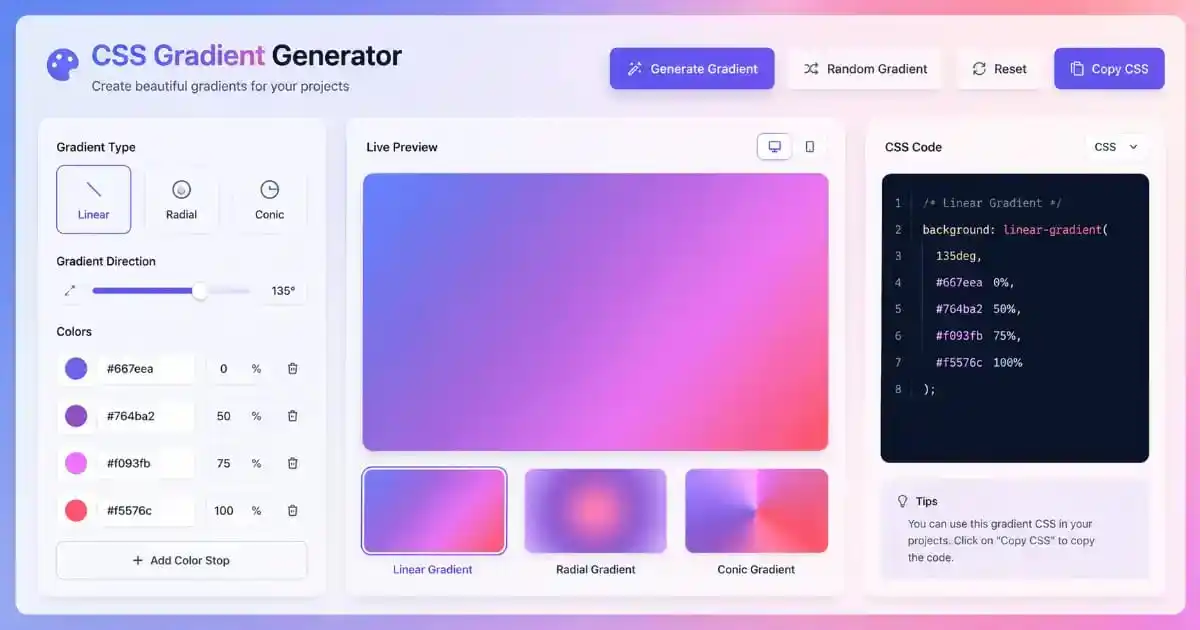
Note: Colors set to #ffffff (white) at the end are ignored if more than 2 colors are active.
What Is a CSS Gradient Generator?
The purpose of a CSS Gradient Generator is to provide a graphical bridge between complex code and visual beauty. Historically, web designers had to use static images to achieve color transitions. This approach was flawed because it increased page load times and made mobile responsiveness a nightmare to manage across different breakpoints.
With the rise of CSS3, browser engines like WebKit and Gecko introduced native rendering for color stops. Our tool simplifies this process by providing a draggable, clickable interface. Instead of remembering the complex syntax for color stops and mathematical angles, you can move sliders and pick colors to see the result live in your browser.
Using a CSS Gradient Generator helps you stay focused on the creative aspect of design rather than the technical syntax. You can experiment with hundreds of color combinations to see what fits your brand identity. Whether it is a subtle “hero” background or a vibrant neon button, gradients add visual depth that flat colors simply cannot achieve.
CSS Gradient Generator Types: Linear, Radial, and Conic
Modern browsers interpret the CSS Gradient Generator outputs through three distinct mathematical models. Linear gradients are the most popular, allowing color to flow along a defined axis. This axis can be horizontal, vertical, or any diagonal angle from 0 to 360 degrees, offering infinite layout possibilities for your web headers.
Radial gradients, on the other hand, originate from a central point and move outward in a circular or elliptical pattern. These are perfect for creating spotlight effects, soft orbs, or button shadows. Our tool allows you to center these gradients precisely to ensure they align with your UI elements perfectly.
Conic gradients are the newest addition, where colors rotate around a center point, much like a color wheel or a pie chart. They are increasingly used in “high-tech” designs, circular loading indicators, and modern data visualizations. Mastering these three types allows you to build truly professional interfaces that rival world-class software applications.
Performance Benefits of CSS Gradient Generator
Choosing a CSS Gradient Generator over traditional image files is a major win for technical SEO. A typical background image for a website can be 200KB to 500KB. In contrast, the code generated by our tool is just a few bytes of text. This massive reduction in weight ensures your site scores higher on Google Core Web Vitals.
Scalability is the second major performance factor. If a user zooms into your site, a background image will become pixelated and blurry. However, CSS gradients are mathematical instructions. They remain sharp and crisp on every resolution, from small mobile screens to massive 8K monitors. This “vector-like” behavior is essential for high-end Retina displays.
If you are looking to further optimize your digital assets, check out our PDF compressor. Just as gradients optimize your code, our compressor ensures your document files remain lightweight without sacrificing visual quality. Keeping your entire digital ecosystem lean is the key to a fast user experience.
How to Use the CSS Gradient Generator
The logic inside our CSS Gradient Generator is designed to be user-friendly for both beginners and pro developers. Start by selecting your primary colors from the picker. You can choose up to five distinct colors to create complex rainbows or subtle professional depths. Use the “Type” dropdown to toggle between linear and radial modes.
Next, adjust the angle slider. For most web banners, a 135-degree or 45-degree angle provides the most professional look. The live preview window updates in milliseconds, providing an instant feedback loop. Once you have perfected the look, click the “Copy CSS” button and paste it directly into your stylesheet or WordPress customizer.
For more creative UI layouts, you can combine these gradients with unique shapes. Visit our CSS clip path generator to create custom containers that sit on top of your backgrounds. Clipping shapes on top of a beautiful gradient background creates a high-end visual aesthetic used by top-tier tech companies.
SaaS Design with CSS Gradient Generator
A professional CSS Gradient Generator is a staple in the SaaS (Software as a Service) industry. Look at modern dashboards; they rarely use flat colors. They use subtle gradients to separate different modules or widgets. This creates a “card-based” layout where elements seem to float on the page, improving user focus and navigation.
If you want to achieve the “Frosted Glass” effect, you need a background layer. You can use our glassmorphism CSS generator alongside your gradient to create translucent, modern panels. This combination is currently the gold standard for premium mobile app designs and web-based software portals.
Accessibility should never be secondary to design. When placing text on these backgrounds, ensure the contrast is high. Use our percentage calculator to determine if your color ratios meet the WCAG accessibility guidelines. Beautiful design is only effective if every user can read and interact with your content easily.
Accessibility and CSS Gradient Generator
Ensuring that your color choices are inclusive is a critical responsibility for any web creator. When you generate a background, always test it against the text color you plan to use. Dark gradients require light text, and light gradients require dark text. This prevents eye strain and makes your website usable for people with visual impairments.
Furthermore, consider adding a fallback background color. Not every browser (though rare now) or every user with high-contrast settings will see your gradient perfectly. Providing a solid background-color property ensures that your site remains functional even in the most restricted environments. Professionalism is about consistency across all possible user scenarios.
For financial applications, such as an EMI calculator or a scientific calculator, using gradients can help highlight the “Total” or “Result” area. Drawing the eye to the most important data point is a core principle of effective UX design that leads to higher user satisfaction and conversion rates.
Optimizing Developer Workflows With the CSS Gradient Generator
Speeding up your coding process is why we built this CSS Gradient Generator. Instead of wasting time on trial and error in the DevTools console, you can prototype your entire color scheme here in seconds. This allows you to spend more time on complex JavaScript logic or backend features that drive the true value of your web application.
On a team, it helps to treat your best gradients as shared assets rather than one-off choices. Save the CSS this generator outputs as named custom properties in a shared stylesheet, such as --gradient-hero or --gradient-cta, so every developer references the same values instead of each person picking a slightly different blue by eye.
When a gradient comes from a design file rather than starting here, paste the exact hex values from Figma or Photoshop into the color pickers above and compare the rendered result against the original mockup. Design tools and browsers sometimes interpret color spaces a little differently, and catching that mismatch before the code ships is far easier than debugging it in production later.
CSS Gradient Generator Technical Engine Rendering
Inside the browser, gradients are rendered using mathematical interpolation. The browser calculates the distance between point A and point B and fills the pixels with a smooth blend of colors. This is why CSS gradients look better than low-quality JPEGs; there is zero compression artifacting or “banding” on high-quality displays.
Even with that clean interpolation, a smooth gradient between two close colors can sometimes show faint visible stripes, an effect called banding. It happens because an 8-bit display only has 256 shades per color channel to work with, which isn’t always enough to render a truly smooth transition. Browsers apply some dithering to soften this automatically, and adding a third color stop that sits between your two main colors in this generator often removes the last traces of banding on a large hero background.
Beyond a single smooth transition, the repeating-linear-gradient() and repeating-radial-gradient() functions reuse the same color stops over and over across an element, which is how CSS produces striped backgrounds, subtle diagonal patterns, or radar-style rings without a single image file. They accept the same color and angle syntax this generator outputs, so a gradient you build here is a reasonable starting point to adapt into a repeating pattern by hand.
Related Design and PDF Tools
CSS Gradient Generator output pairs well with other tools. Web development is more than just colors. You can use our CSS border radius generator to round the corners of your gradient containers. Soft edges combined with smooth color transitions create a modern “app-like” feel that users find very engaging and modern in 2026.
To add elevation, try our CSS box shadow generator. Shadows help your elements “pop” off the gradient background, creating a 3D hierarchy that guides the user’s journey. For complex background textures, the CSS background pattern generator can be layered with gradients for a truly unique aesthetic.
One popular technique this generator doesn’t show directly is applying a gradient to text instead of a background. Setting background-clip: text together with a transparent text color lets the gradient show through the letters themselves, which is how many modern headlines get that colorful, eye-catching look. Take the CSS this tool produces, apply it as a background on a text element, then add -webkit-background-clip: text; color: transparent; to reveal it.
Gradients also work well as borders, not just fills. Since a standard border can’t take a gradient directly, the usual approach is a transparent border combined with background-image and background-origin: border-box, or a gradient applied to a pseudo-element positioned just behind the element. It takes a few extra lines of CSS, but it produces a colorful outline that a plain border color could never achieve on its own.
Future Trends for CSS Gradient Generator
The future of web gradients is moving toward “Mesh Gradients” and dynamic animated backgrounds. While current CSS doesn’t support mesh gradients natively, you can simulate them by layering multiple radial gradients. Our tool is being updated to support these advanced stacking techniques to keep your designs ahead of the curve.
In 2026, we are seeing a shift toward organic, fluid gradients that mimic natural light. Using a CSS Gradient Generator to create these “soft-light” styles will be essential for AI-driven interfaces and VR/AR web experiences. Staying updated with these trends ensures that your digital products remain modern and relevant for the next generation of web users.
Color Theory Foundations for CSS Gradient Generator
Understanding the underlying principles of color theory transforms a basic CSS Gradient Generator into a powerful design instrument. The color wheel serves as the foundational map, illustrating the relationships between primary, secondary, and tertiary hues. When you select colors that sit opposite each other on the wheel, you create complementary gradients that generate maximum visual contrast and energy. These combinations are ideal for call-to-action buttons and promotional banners where immediate user attention is paramount.
Analogous color schemes, which utilize hues that sit adjacent to one another, produce harmonious and soothing transitions. These gradients work exceptionally well for healthcare platforms, meditation applications, and wellness websites where the goal is to establish calm and trust. Triadic color combinations, spaced evenly around the color wheel, offer vibrant yet balanced palettes that feel playful without becoming overwhelming. Mastering these relationships allows you to move beyond random color selection and into intentional, psychology-driven design decisions.
The concept of color temperature also plays a critical role in gradient effectiveness. Warm gradients featuring reds, oranges, and yellows evoke feelings of excitement, urgency, and comfort. They are frequently deployed in food delivery applications and e-commerce sale events. Cool gradients incorporating blues, greens, and purples communicate professionalism, tranquility, and technological sophistication. Financial technology platforms and corporate SaaS products leverage these cooler palettes to establish credibility and stability in the minds of their users.
CSS Gradient Generator Psychological Impact of Gradient Choices
Every gradient you generate carries an emotional payload that influences user behavior on a subconscious level. Research in environmental psychology demonstrates that color transitions affect mood, dwell time, and even purchasing decisions. A gradient that shifts from deep navy to bright cyan can create a sense of ascending progress, making it perfect for onboarding flows and achievement screens. This upward visual momentum psychologically reinforces the feeling of advancement and success.
Gradient density also impacts cognitive load. Dense gradients with rapid color changes across short distances create visual tension and excitement. These are effective for gaming interfaces, entertainment platforms, and youth-focused brands. Conversely, sparse gradients with gentle transitions over large areas reduce mental fatigue and support extended reading sessions. Content-heavy platforms like blogs, documentation sites, and educational portals benefit from these understated background treatments that remain present without demanding attention.
The directionality of your gradient carries implicit meaning that users intuitively understand. Left-to-right gradients suggest progression, timelines, and forward movement. Top-to-bottom gradients evoke gravity, stability, and grounding. Diagonal gradients at forty-five degrees create dynamic energy and motion, while steeper angles approaching vertical generate dramatic tension. Understanding these directional cues allows you to align your visual language with the narrative structure of your content.
CSS Gradient Generator Implementation Strategies for Production Environments
When transitioning from a CSS Gradient Generator prototype to a live production environment, several technical considerations ensure optimal performance. Always specify a fallback background-color before your gradient declaration. This solid color displays immediately while the gradient renders and provides a safety net for older browsers or users with forced color modes enabled in their accessibility settings. The fallback should represent the dominant color from your gradient palette.
Consider using CSS custom properties to manage your gradients dynamically. By defining color stops as variables, you enable theme switching, user customization, and A/B testing without modifying multiple lines of code. This approach also facilitates dark mode implementation, where gradients may need to shift toward darker, more saturated versions of your brand colors. Modern design systems increasingly rely on token-based architectures that make gradient management scalable across large development teams.
For complex interfaces requiring multiple gradient layers, the background property accepts stacked declarations separated by commas. The first gradient in the list sits at the top of the visual stack, with subsequent layers appearing beneath. This stacking capability enables sophisticated effects like gradient overlays on photographic backgrounds, textured noise layers, and dual-tone split backgrounds. However, exercise restraint as excessive layering increases paint complexity and can impact rendering performance on lower-end devices.
CSS Gradient Generator Animated Gradients and Motion Design
Static gradients provide visual richness, but animated gradients introduce temporal dimensionality that captures and maintains user attention. The most common technique involves shifting the background-position of a large linear gradient over time, creating a slow-moving color wave effect. This approach works beautifully for hero sections and loading screens where you want to convey activity and life without distracting from primary content. The key is maintaining subtlety through long animation durations and minimal position shifts.
Another emerging technique uses hue-rotate filter animations to cycle through the entire color spectrum while maintaining the underlying gradient structure. This creates a living, breathing background that feels organic and responsive. When implementing animated gradients, always respect the prefers-reduced-motion media query. Users with vestibular disorders or motion sensitivity can experience discomfort from continuous background movement. Providing a static alternative demonstrates inclusive design practices that protect your brand reputation.
Scroll-triggered gradient transitions represent the cutting edge of interactive background design. As users navigate down a page, the gradient shifts from one palette to another, marking content section boundaries and creating narrative progression. This technique requires careful performance monitoring, as frequent gradient recalculations during scroll events can strain the browser’s compositor. Implementing these effects with Intersection Observer rather than continuous scroll listeners optimizes computational efficiency.
CSS Gradient Generator Cross-Browser Testing and Quality Assurance
While modern browsers have achieved excellent consistency in gradient rendering, subtle differences persist that can impact your design integrity. Safari occasionally renders radial gradients with slightly different center-point calculations compared to Chromium-based browsers. Firefox applies gamma correction differently, which can make gradients appear slightly darker or more saturated. Testing your generated gradients across multiple browser engines ensures visual consistency for your entire user base.
Mobile testing deserves particular attention due to the wide variety of screen technologies in use. OLED displays render deep blacks and vibrant colors with exceptional accuracy, making high-contrast gradients appear stunning. LCD panels, however, may exhibit backlight bleed that reduces the perceived depth of dark gradients. Testing on both display technologies helps you identify whether your gradient choices maintain their intended impact across the full spectrum of user devices.
Automated visual regression testing tools like Percy or Chromatic can catch gradient rendering discrepancies before they reach production. These services capture screenshots of your components across multiple browsers and flag pixel-level differences. While primarily used for component libraries, integrating gradient preview screenshots into your visual testing pipeline provides an additional safety net. This proactive approach prevents the subtle but potentially brand-damaging inconsistencies that manual testing might miss.
FAQ for CSS Gradient Generator
CSS Gradient Generator What is the difference between Linear and Conic?
Linear gradients move colors along a straight line (horizontal or diagonal). Conic gradients rotate colors around a center point, creating a wheel effect. This tool lets you try both styles to see which fits your interface better.
CSS Gradient Generator Are these gradients responsive?
Yes! CSS gradients are mathematical. They automatically stretch or shrink to fit the size of their container without any loss in quality. This makes them much better than background images for mobile-first design.
CSS Gradient Generator Can I use these for buttons?
Absolutely. You can apply the generated code to the background property of any HTML button. Combining a gradient with a hover effect creates a highly interactive feel for your users.
CSS Gradient Generator Is the code compatible with Safari?
Yes, all standard CSS3 gradients are fully supported by Safari, Chrome, Firefox, and Edge. You don’t need to add manual prefixes like -webkit- anymore for modern browser versions.
CSS Gradient Generator Conclusion
In conclusion, the CSS Gradient Generator is more than just a simple color picker; it is a fundamental pillar of modern front-end development. By replacing heavy images with lightweight code, you are building a faster, more accessible, and more professional web for your users. We invite you to experiment with different settings and save your favorites.
Thank you for choosing our tools to power your creative journey. Whether you are building a personal portfolio, a SaaS startup, or a corporate website, we are here to provide the highest quality utilities for free. Happy designing and keep building the future of the internet!
For more technical details, visit the MDN Web Docs. To learn about design trends, follow CSS-Tricks or web.dev by Google. For browser compatibility info, check Can I Use. You can also explore inspiration on Dribbble to see how the world’s best designers are using gradients today.
PixaPDF Tools
This CSS Gradient Generator is built and maintained by PixaPDF Tools. Found an issue or have a suggestion? Reach out through Contact Us.