
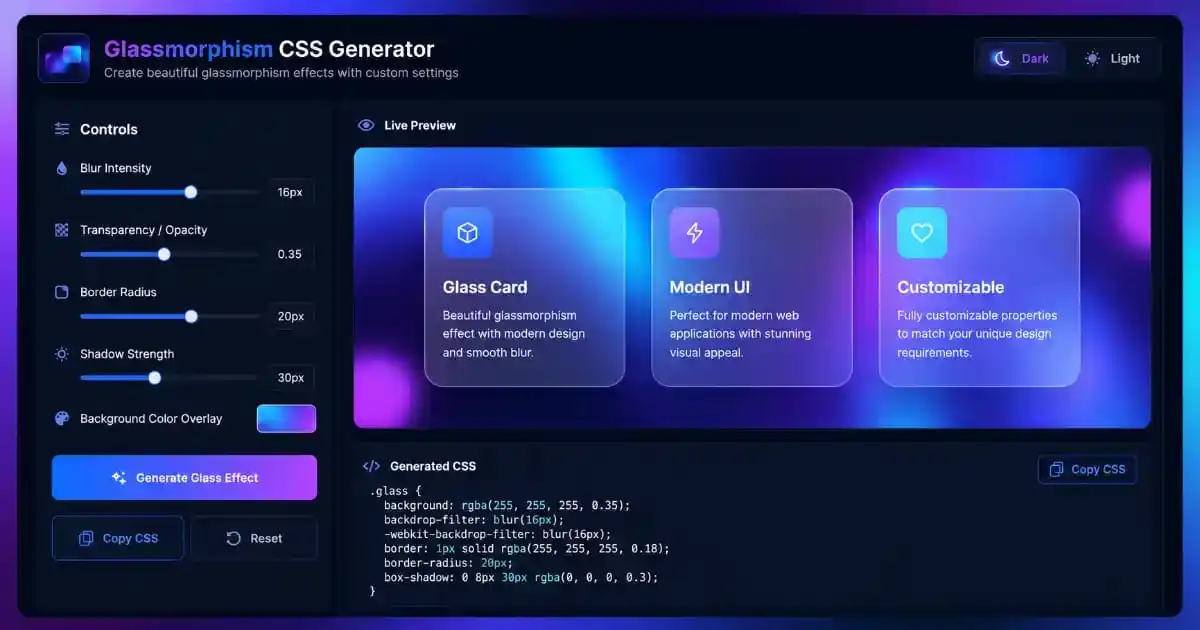
Glassmorphism CSS Generator is a specialized visual workspace designed for developers who want to stay ahead of the latest UI trends. By utilizing modern CSS properties like backdrop-filter and RGBA transparency, our tool allows you to create high-end frosted glass effects without writing a single line of manual code. Whether you are building a SaaS dashboard or a mobile landing page, this generator provides the perfect balance of blur and opacity for your components.
Introduction to Modern UI Design
The web design landscape is constantly evolving, and one of the most prominent trends in recent years is the frosted glass effect. This aesthetic, characterized by transparency and background blurring, mimics the look of high-quality glass. Our Glassmorphism CSS Generator is built to simplify the creation of these effects for frontend developers of all skill levels.
Visual depth is crucial in modern interfaces. By using glass cards, designers can create a sense of hierarchy where the primary content floats above vibrant backgrounds. This style is often found in Apple’s iOS and Microsoft’s Windows 11 operating systems. With our professional tool, you can achieve that same premium look in seconds.
Before the advent of the backdrop-filter property, achieving this effect required complex image processing or multi-layered background hacks. Now, the Glassmorphism CSS Generator leverages native browser capabilities to render stunning visuals while keeping your code clean and lightweight. This ensures that your website stays fast and responsive.
What is Glassmorphism CSS Generator?
A Glassmorphism CSS Generator is a specialized software utility that allows you to visually manipulate CSS properties to create transparent, blurred elements. Instead of guessing hex codes and blur values, you can use sliders to see real-time updates. This eliminates the “trial and error” cycle typically associated with CSS styling.
The tool works by combining background: rgba() for transparency with backdrop-filter: blur() for the frosted look. You can also add borders to simulate the reflection on the edge of the glass. By using our tool, you are ensuring that your designs follow modern standards while remaining accessible and SEO-friendly.
If you are also working on branding assets, you might need to Merge PDF documents containing your style guides. Organizing your creative work is just as important as the design itself. A cohesive design system often requires combining multiple files into one comprehensive presentation for clients.
Key Features of the Glassmorphism CSS Generator
Our professional Glassmorphism CSS Generator offers several intuitive controls to help you craft the perfect UI. The blur intensity slider is the most important, as it determines how much the background elements are obscured. Low blur creates a thin glass look, while high blur results in a dense, heavy frost effect.
Transparency controls allow you to find the “sweet spot” where text is readable but the background colors still shine through. We also included a border radius slider, which pairs perfectly with our CSS Border Radius Generator for creating soft, modern corners on your containers.
To further enhance the effect, you can pick any background color overlay. While white is the standard for light-mode glass, using dark colors with low opacity creates a sophisticated dark-mode aesthetic. The Glassmorphism CSS Generator also features a one-click copy button to speed up your development workflow significantly.
Performance and SEO Benefits
Using code-based effects instead of heavy images is a major performance win. Search engines like Google prioritize fast-loading websites, and the Glassmorphism CSS Generator helps you achieve that by providing CSS code that takes only bytes to load. This is much more efficient than using large transparent PNG files.
Good performance leads to better Core Web Vitals scores. When your UI elements are rendered natively by the browser’s GPU, scrolling remains smooth and CPU usage stays low. If you find your website documentation is getting too large, consider using a PDF Compressor to keep your project files lightweight as well.
SEO is also about user engagement. A beautiful, modern interface reduces bounce rates and encourages users to spend more time on your page. By using the Glassmorphism CSS Generator, you are investing in a user experience that not only looks professional but also functions perfectly across all devices and browsers.
Advanced Design Tips for Glass UI
To make your glass effects truly pop, the background matters more than the card itself. Always use vibrant, high-contrast backgrounds underneath your frosted elements. You can create perfect backdrops with our CSS Gradient Generator to provide the necessary color play that makes the blur effect visible.
Contrast is key for accessibility. Ensure that any text placed inside a glass container has sufficient contrast against the blurred background. If you are struggling with readability, try increasing the opacity or darkening the background overlay in the Glassmorphism CSS Generator. Don’t sacrifice usability for style; the best designs do both.
Layering is another secret technique. Placing a smaller, more opaque glass card inside a larger, more blurred card creates a sense of profound depth. This “Z-index” hierarchy is what separates amateur designs from high-end SaaS products. Experiment with shadows using our CSS Box Shadow Generator to lift the glass card off the screen.
Using Other CSS Generators
Design is an ecosystem, and our suite of tools is built to work together. While creating shapes, you can use the CSS Clip Path Generator to cut your glass cards into unique geometric forms. This adds a level of creativity that standard rectangular cards cannot provide.
Texture can also be added behind the glass. Use the CSS Background Pattern Generator to create subtle dots or grids that appear inside the blurred area. This mimics the microscopic texture found in real-world etched glass, providing a more tactile and realistic feel for the user.
Consistency is vital for brand trust. Ensure that your border widths and shadow intensities match across all components. By utilizing the Glassmorphism CSS Generator alongside our other generators, you can maintain a unified design language that looks cohesive and professional throughout your entire web application.
Integrating Design with PDF Tools
Designers often need to share their CSS work with clients in professional reports. You can Add Watermark to your design documents to protect your intellectual property before final approval. This ensures that your custom glass effects aren’t used without your permission during the bidding process.
If you have a large portfolio of CSS snippets, you can Split PDF files to send specific sections to different team members. Organization is a core part of project management. Even after using the Glassmorphism CSS Generator, the way you present your code to your team matters for long-term project success.
Sometimes you might receive locked files that contain important design assets. Use our tool to Unlock PDF files so you can extract colors and fonts for your UI. Once you have access, you can use the Glassmorphism CSS Generator to match the existing brand colors perfectly in your new frosted glass components.
Formatting is also important for readability. Use Add Page Numbers to your technical documentation to help developers navigate through complex styling rules. Whether you are rotating sideways screenshots with Rotate PDF or cleaning up margins with Crop PDF, our platform has you covered.
Calculators and Business Utilities
Beyond design, our platform provides essential utilities for your daily business needs. If you are a freelancer, you might use the Free Invoice Generator to bill clients for your web development work. Professional invoicing is just as important as high-quality CSS generation for your career growth.
For financial projects, try our Percentage Calculator or the EMI Calculator to build functional financial widgets. These tools can be styled using the Glassmorphism CSS Generator to create a modern financial dashboard that users will love interacting with every single day.
Health apps also benefit from clean UI. You can integrate a BMI Calculator into a glass-themed fitness portal. Even complex tools like the Scientific Calculator and Age Calculator look better when wrapped in modern frosted glass containers generated by our tool.
Security and Document Safety
Safety should never be overlooked when handling digital files. If you are sharing sensitive design specs, remember to Protect PDF files with a strong password. This keeps your Glassmorphism CSS Generator settings and custom code private until the project is officially launched.
If your document contains old logos or sensitive information, use Remove Watermark to clean it up before sending it to stakeholders. Managing the final look of your documents is just as important as managing the CSS code. You can also Rearrange PDF pages to ensure your design presentation follows a logical and persuasive order.
For more technical details on CSS standards, you can visit the W3C Official Website. Understanding the math behind CSS functions can also be helped by using a Scientific Calculator for precision coordinates. Always keep your browser updated to the latest versions via Google Chrome or Mozilla Firefox to see glass effects correctly.
Accessibility Considerations for Glass UI
When implementing frosted glass effects in production environments, accessibility must remain a top priority. The Glassmorphism CSS Generator produces code that works beautifully, but designers should always test their results against WCAG contrast guidelines. Transparent backgrounds can sometimes reduce text legibility, especially for users with visual impairments.
Consider adding a subtle text shadow to improve readability within glass containers. This technique creates a halo effect around characters, making them stand out against blurred backgrounds. The Glassmorphism CSS Generator allows you to experiment with opacity levels that maintain both aesthetic appeal and functional clarity for all users.
Screen readers do not interpret visual effects, so ensure your HTML structure remains semantic. Use proper heading hierarchies and ARIA labels where necessary. While the glass effect enhances visual presentation, the underlying markup must support assistive technologies. Our generator produces clean CSS that does not interfere with screen reader functionality.
Mobile-First Glassmorphism Strategies
Mobile devices present unique challenges for glass effects due to varying screen sizes and hardware capabilities. The Glassmorphism CSS Generator creates code that performs well on smartphones, but you should consider reducing blur intensity on lower-end devices. Heavy backdrop-filter usage can cause frame drops during scrolling on older mobile processors.
Touch interfaces benefit from larger glass cards with generous padding. When users tap on mobile screens, they need clear visual feedback. The frosted glass effect can serve as an excellent container for interactive elements like buttons and form inputs. Our tool helps you size these components appropriately for thumb-friendly navigation.
Consider using media queries to adjust glass properties based on device orientation. Landscape mode on tablets provides more horizontal space, allowing for wider glass panels. The Glassmorphism CSS Generator gives you the foundation code that you can easily extend with responsive breakpoints for optimal cross-device experiences.
Dark Mode Glassmorphism Techniques
Dark mode interfaces have become standard across operating systems and web applications. The Glassmorphism CSS Generator excels at creating both light and dark themed glass effects. For dark mode implementations, use deep charcoal or navy backgrounds with slightly higher opacity values to prevent the glass from becoming invisible against dark surfaces.
Subtle inner shadows can enhance the three-dimensional quality of dark glass cards. This technique simulates light passing through tinted glass rather than reflecting off it. Experiment with the color picker in our generator to find rich, dark tones that maintain the ethereal quality associated with premium glass interfaces.
When designing for dark mode, pay special attention to border colors. Pure white borders can appear harsh against dark glass. Instead, use desaturated tones that complement your background palette. The Glassmorphism CSS Generator enables precise color selection to achieve harmonious dark mode aesthetics.
Animating Glass Elements Smoothly
Static glass effects are impressive, but adding subtle animations elevates the user experience significantly. When glass cards enter the viewport, consider using a gentle fade-in combined with a slight upward translation. The Glassmorphism CSS Generator provides the base styles that pair beautifully with CSS transitions and keyframe animations.
Hover states on glass elements should feel responsive and tactile. A slight increase in background opacity during hover creates the illusion of the glass thickening under the user’s cursor. Combine this with a subtle scale transformation to make interactive glass components feel alive and responsive to user input.
Parallax scrolling effects work exceptionally well with glassmorphism. As background shapes move at different speeds than foreground glass cards, the depth illusion intensifies. The blur effect naturally draws attention to foreground content while maintaining visual interest in the background layers.
Color Theory Behind Effective Glass Effects
Successful glassmorphism relies heavily on strategic color choices. The Glassmorphism CSS Generator empowers designers to select optimal hues for their specific projects. Warm backgrounds like coral or amber create inviting, energetic interfaces, while cool tones like teal and lavender evoke calm, professional atmospheres.
Complementary color schemes work particularly well beneath glass overlays. When contrasting colors blur together behind a semi-transparent surface, they create dynamic, shifting gradients that feel organic and alive. Our generator allows you to preview how different background colors interact with your chosen glass tint.
Monochromatic glass designs offer a sophisticated alternative to colorful approaches. Using varying shades of a single color family creates elegant, cohesive interfaces. The Glassmorphism CSS Generator supports precise color adjustments that help you achieve subtle tonal variations within a unified palette.
Framework Integration and Component Libraries
Modern development workflows often rely on component-based architectures. The CSS output from our Glassmorphism CSS Generator integrates seamlessly with React, Vue, and Angular projects. Simply paste the generated styles into your component’s CSS module or styled-components definition.
Design systems benefit from standardized glass properties. Create CSS custom properties or Sass variables based on your generator output to maintain consistency across hundreds of components. This approach ensures that every glass card in your application shares identical blur values and opacity ratios.
Tailwind CSS users can extend their configuration file with custom utilities derived from the Glassmorphism CSS Generator. Add backdrop-filter and background-opacity utilities to your theme extensions. This allows you to apply glass effects using utility classes while maintaining the design system’s centralized control.
Cross-Browser Testing Protocols
While modern browsers widely support backdrop-filter, testing remains essential. Safari requires the -webkit- prefix, which our Glassmorphism CSS Generator automatically includes. Always verify that your glass effects render correctly on the latest versions of Chrome, Firefox, Safari, and Edge before deploying to production.
Firefox historically had limited backdrop-filter support, though recent versions have improved compatibility. Test your glass components on actual devices rather than relying solely on browser emulators. Real hardware reveals performance characteristics that virtual environments cannot accurately simulate.
Progressive enhancement strategies ensure graceful degradation. Provide solid background colors as fallbacks for browsers that do not support backdrop-filter. The Glassmorphism CSS Generator produces code where the background property serves this dual purpose effectively.
Frequently Asked Questions
Does glassmorphism work on all browsers?
The Glassmorphism CSS Generator creates code compatible with most modern browsers. However, very old versions of Internet Explorer do not support the backdrop-filter property. Always provide a fallback background color for older browsers.
How do I make the glass more realistic?
The secret to realism in the Glassmorphism CSS Generator is adding a thin, semi-transparent border and a very subtle drop shadow. This simulates the edge refraction and physical elevation of the glass material.
Can I use these effects in WordPress?
Yes, simply copy the code from our generator and paste it into the “Custom CSS” section of your WordPress theme or inside a CSS block in your page builder like Elementor or Divi.
Is this tool free to use for commercial projects?
Absolutely. The Glassmorphism CSS Generator is 100% free and open for both personal and commercial web development projects. We do not require any attribution, though it is always appreciated.
Conclusion
Mastering the frosted glass effect is a powerful skill for any modern web creator. Our Glassmorphism CSS Generator is designed to make this process as easy and efficient as possible. By reducing the complexity of CSS coding, we empower you to focus on what truly matters: creating incredible user experiences.
We invite you to experiment with all the sliders and buttons. Try different color overlays and blur levels until you find the perfect look for your brand. Thank you for choosing our platform for your design and PDF management needs. We are constantly updating our tools to provide you with the best experience possible on the web.
For more design inspiration, check out the Dribbble Portfolio Community to see how other pros are using glassmorphism. You can also learn deep CSS techniques at CSS-Tricks. Keep building, keep designing, and keep making the web a more beautiful place for everyone to enjoy.
Lastly, don’t forget to bookmark this Glassmorphism CSS Generator for your future projects. Consistency and speed are the hallmarks of a great developer, and we are here to support your journey every step of the way. Happy designing!