
Password Generator Online – Create Strong & Secure Passwords Instantly
Secure your digital life with our 100% free strong security tool. Create unbreakable passwords for all your accounts.
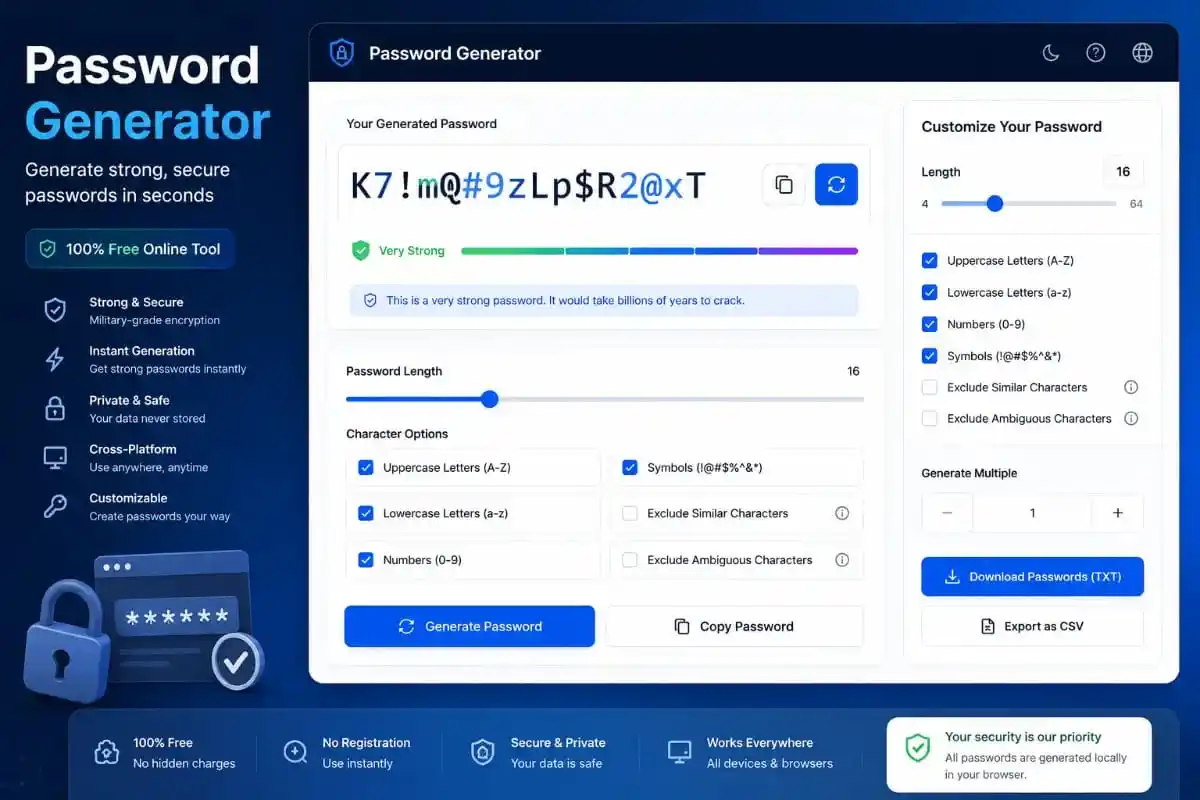
A Password Generator is an essential companion in the modern era of digital threats and constant connectivity. As we move our entire lives—from banking to personal conversations—onto the web, the strength of our digital locks has never been more important. Every day, thousands of accounts are compromised because of simple, predictable passwords. By using a specialized algorithm, our tool ensures that you no longer have to rely on your memory or common words to protect your valuable data.
Why You Need a Password Generator for Your Accounts
The primary reason to use a Password Generator is the sheer unpredictability it offers. Humans are inherently patterned creatures; we often choose words related to our surroundings, birthdays, or pet names. Hackers know this and use “dictionary attacks” that try millions of known words in seconds. A random string of characters, however, presents a mathematical wall that is virtually impossible to scale. When you use our tool, you are creating a unique signature for each of your digital platforms.
Furthermore, the variety of characters provided by a Password Generator increases what security experts call “entropy.” High entropy means high randomness. Imagine a lock that has 100 trillion possible combinations instead of just 1,000. That is the difference between a password like “bluehouse” and something generated by our system. It provides a level of security that manual creation simply cannot match, giving you peace of mind while you browse, shop, or work online.
Key Features of our Professional Password Generator
We have meticulously built this Password Generator to be the most beginner-friendly and efficient tool on the market. Unlike other complex software, our interface is clean and straightforward. You can customize your security level by choosing the exact length of your key. Whether you need a short 8-character code for a simple forum or a massive 32-character string for your crypto wallet, our tool handles it with precision and speed.
- Dynamic Randomness: Every click produces a completely new, mathematically unique string.
- Multiple Character Sets: Mix uppercase, lowercase, digits, and special symbols effortlessly.
- Visual Feedback: Our strength meter tells you exactly how secure your new key is.
- Privacy First: Our Password Generator runs entirely in your browser, meaning no data is ever sent to our servers.
How the Password Generator Works (User Guide)
Using our Password Generator is designed to be a frictionless experience for users of all skill levels. To begin, simply navigate to the settings grid and decide on the length of your password. We generally recommend at least 16 characters for maximum safety. Next, toggle the character options to include a healthy mix of symbols and numbers. Finally, press the “Generate” button and watch as a new, secure string appears instantly in the display box above.
Once you are happy with the result, use the “Copy” button to save it to your clipboard. You can then paste it directly into your account settings. For even better organization, we recommend pairing this tool with our Password Generator saved results or a trusted password manager. If you need other digital utilities, feel free to explore our URL Shortener or Barcode Generator to further enhance your online presence and business operations.
The Science of Cybersecurity and Brute Force Attacks
To truly appreciate the value of a strong random string, one must understand how modern hacking works. A “brute force” attack is where a computer program attempts to guess a password by trying every possible combination. If your password is “cat123”, a computer will find it in less than a second. However, a 16-character random string from a Password Generator would take the same computer quintillions of years to crack. This mathematical advantage is your best defense against identity theft and unauthorized access.
Modern security standards, as defined by organizations like OWASP, emphasize the importance of special characters. These symbols—like @, #, and $—add a whole new dimension of complexity to your login credentials. By integrating these symbols through our tool, you are adhering to the highest global standards of digital hygiene. For more information on why randomness matters, you can check out PasswordsGenerator.net or the security blogs at LastPass.
Main Benefits of Using an Automated Password Generator
The first benefit of an automated Password Generator is the elimination of “Decision Fatigue.” We make so many choices every day; choosing a strong password shouldn’t be a stressful one. By letting the tool handle the randomness, you save mental energy and time. Secondly, it prevents the habit of “Password Re-use.” Re-using the same password across multiple sites is the number one cause of massive data breaches. Our tool makes it so easy to create new passwords that you will never feel tempted to use the same one twice.
The Psychology Behind Weak Passwords
Why do we choose weak passwords? It is a psychological phenomenon where our brains prefer “Availability” over “Security.” We choose words that are easy to recall because we fear being locked out of our own accounts. However, this convenience is a double-edged sword that hackers exploit. By moving away from “memory-based” passwords and toward “generated” ones, we overcome this cognitive bias. A Password Generator acts as an external brain that prioritizes safety over familiarity.
In a professional setting, the risks are even higher. If an employee uses a weak password, it could compromise the entire company’s database. This is why many IT departments now mandate the use of a Password Generator for all company-wide accounts. It sets a baseline of security that protects sensitive client information and proprietary data from corporate espionage and random malware attacks. Creating a culture of strong security starts with the simple act of generating a random string.
Common Use Cases for a Password Generator
Where should you apply these generated keys? Everywhere! From your simple Netflix login to your highly sensitive cryptocurrency exchange account. Every entry point to your digital identity needs a unique lock. For developers, a Password Generator is useful for creating random API keys or database credentials during the development phase. For social media managers, it ensures that brand accounts are safe from hijacking. Even for students, keeping educational portals secure is vital for protecting academic records and research.
If you are also working on branding, you might find that your digital assets need to be shared securely. You can use our QR Code Generator to share links or our Image to Base64 tool for your coding projects. The goal of PixaPDF Tools is to provide a holistic ecosystem where your data is not only processed efficiently but kept safe through the power of a strong Password Generator. Security is not a one-time event; it is a continuous process of improvement.
The Future of Authentication: Beyond Passwords?
There is much talk about “Passkeys” and biometrics like facial recognition or fingerprints. While these technologies are promising, the traditional password remains the most widely supported and reliable form of authentication globally. Until every website on earth supports biometrics, a Password Generator will remain the most critical tool in your security arsenal. It is the bridge between the old way of doing things and the high-tech future of secure identification.
Moreover, even biometrics often have a “backup password” in case the sensor fails. That backup must be the strongest possible string you can create. Don’t let your backup be the weak link in your security chain. Use our tool to ensure that every layer of your defense is solid. For those interested in the deep technical aspects of web security, visiting the W3C website can provide insights into the future standards of web authentication and data protection protocols.
How to Safely Store Your Generated Passwords
Once you have used our Password Generator, the next question is storage. We never recommend writing them on paper or saving them in a plain text file on your desktop. The best way is to use an encrypted Password Manager. These apps store your strings in a “vault” that is protected by one “Master Password.” This way, you only have to remember one strong key, and the app handles the rest. This combination of a Password Generator and a manager is the gold standard for personal and professional security in 2026.
Final Tips for Maintaining a Secure Digital Life
Always enable Two-Factor Authentication (2FA) alongside your strong passwords. Even if a hacker miraculously guesses a 16-character string from a Password Generator, they still won’t be able to enter your account without the second code from your phone. This multi-layered approach is how the world’s top security experts stay safe. Also, make it a habit to refresh your most important passwords every six months. Using our tool makes this process quick and painless, ensuring your locks are always “fresh” and unpredictable.
Frequently Asked Questions
Conclusion: Start Using a Password Generator Today
In conclusion, the small effort of using a Password Generator today can prevent a massive disaster tomorrow. Whether you are protecting your personal photos, your business emails, or your financial assets, a strong random password is your best defense. We are proud to offer this tool for free to help make the internet a safer place for everyone. Don’t settle for “good enough” when it comes to your security.
Our Password Generator is part of a larger mission to empower users with professional-grade tools. By choosing to use a Password Generator, you are joining millions of security-conscious individuals worldwide. Thank you for trusting PixaPDF Tools and our premium Password Generator for your digital safety needs.