
Bulk Image Compressor
Compress single or multiple images, right in your browser — free.
Click to upload or drag and drop
One image or many at once — JPG, PNG, WebP, AVIF — max 25MB each
Image Compressor 100% Free Online Fast & Secure Tool is the most efficient way to handle heavy visual files that slow down your digital experience. High-quality images are beautiful, but their large file sizes can be a major hurdle for website owners and social media enthusiasts. By using the Image Compressor 100% Free Online Fast & Secure Tool, you can instantly shrink your photos while keeping them looking sharp and professional.
Digital storage is often limited, and sending large attachments via email can be frustrating. Our Image Compressor 100% Free Online Fast & Secure Tool solves this by using advanced algorithms to remove hidden data that isn’t needed for screen viewing. This ensures your images load faster on mobile devices and desktops alike, providing a smooth experience for every visitor.
Explore More Pro Tools:
- Reduce document sizes with our PDF Compressor.
- Need to change dimensions? Use our Image Resizer.
- Focus on the subject with the Crop Image Tool.
- Switch formats easily from JPG to PNG or PNG to JPG.
What is the Image Compressor 100% Free Online Fast & Secure Tool?
An Image Compressor 100% Free Online Fast & Secure Tool is a specialized web utility that focuses on reducing the number of bytes required to store an image. There are two primary types of compression: lossy and lossless. Lossless compression keeps all the original data, whereas lossy compression strategically removes some details to achieve a massive reduction in size. Our Image Compressor 100% Free Online Fast & Secure Tool gives you the flexibility to choose your preferred balance.
This tool is designed to work directly in your browser. Unlike old-fashioned software, the Image Compressor 100% Free Online Fast & Secure Tool doesn’t require any installation. It uses the power of your computer’s local processing to handle the compression, meaning your private files are never uploaded to a cloud server. This makes it a 100% secure option for sensitive business documents and personal family photos.
Why Should You Use This Tool Regularly?
The first reason to use the Image Compressor 100% Free Online Fast & Secure Tool is speed. In the world of SEO, every millisecond counts. Google prioritizes websites that load quickly. If your blog has uncompressed 5MB images, your ranking will suffer. By running every photo through our Image Compressor 100% Free Online Fast & Secure Tool, you ensure your website remains agile and competitive.
Secondly, storage efficiency is key. Whether you are using a smartphone with limited space or a cloud service like Dropbox, smaller images allow you to store more memories. Many people also use our Background Remover to clean up product shots, and then use the Image Compressor 100% Free Online Fast & Secure Tool to make those shots web-ready for Amazon or Shopify stores.
Key Features of the Tool
- Multi-Format Support: Handles JPG, PNG, and WEBP seamlessly.
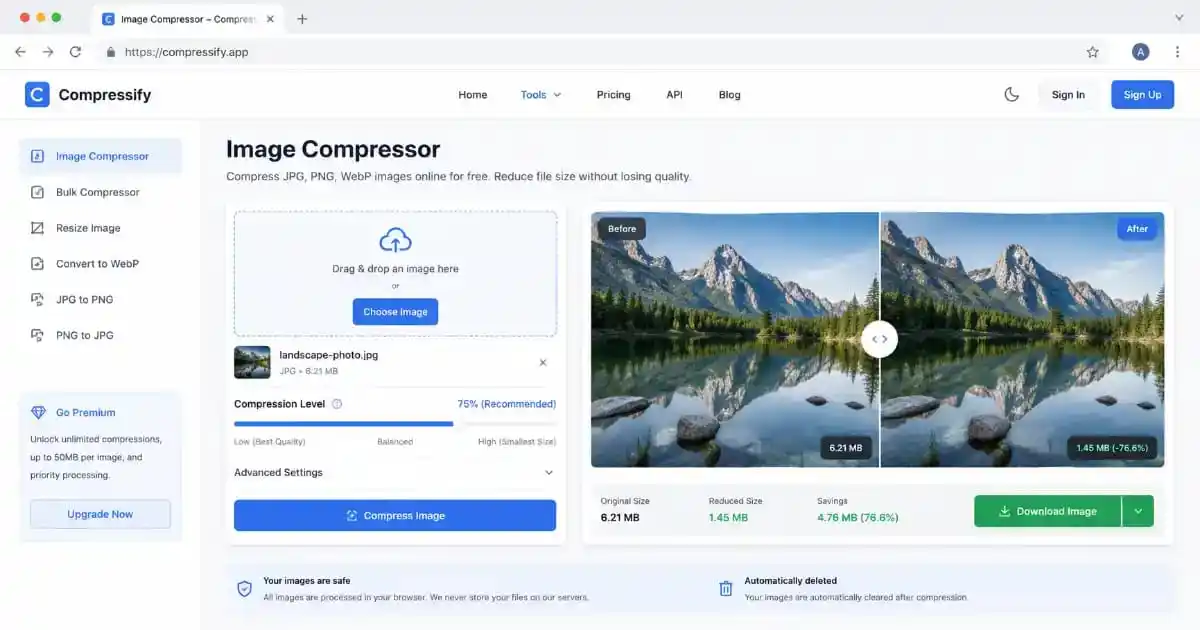
- Instant Preview: Compare the original and optimized versions side-by-side.
- Privacy First: No files are stored on our servers; everything happens on your device.
- No Watermarks: We believe in keeping your images clean and professional.
- Bulk Processing: Optimized to handle files one after another with zero lag.
Detailed Step-by-Step Guide
Getting started with the Image Compressor 100% Free Online Fast & Secure Tool is incredibly simple. Follow these steps for the best results:
- Select your file: Drag your image into the blue box or click to select from your folders.
- Choose Quality: Adjust the slider. We recommend 80% for most web purposes, as it offers a great size reduction with no visible quality loss.
- Verify: Look at the “Saved” percentage to see how much space you’ve reclaimed.
- Download: Hit the download button to save your file. If you have many documents, you might also need to Split PDF or Merge PDF files for better organization.
The Technical Side of Image Optimization
Understanding how images work is part of becoming a better digital creator. Modern web standards are constantly evolving. According to Google’s Web Vitals Documentation, serving correctly sized and compressed images is the most effective way to improve “Largest Contentful Paint” scores. This is where our Image Compressor 100% Free Online Fast & Secure Tool plays a vital role.
Furthermore, image metadata like GPS coordinates, camera settings, and timestamps can add significant weight to a file. Our Image Compressor 100% Free Online Fast & Secure Tool strips away this unnecessary EXIF data, further reducing the file size without touching the pixels. You can find more about image coding standards at the W3C Graphics Portal or explore technical image formats at MDN Web Docs.
Use Cases Across Different Industries
For E-commerce and Small Businesses
If you run an online store, image quality is your silent salesman. However, heavy images lead to cart abandonment on mobile networks. Use the Image Compressor 100% Free Online Fast & Secure Tool to optimize product galleries. After optimizing, you can convert descriptions from Word to PDF to send professional catalogs to your clients.
For Students and Academic Researchers
Research papers often require many charts and diagrams. Using the Image Compressor 100% Free Online Fast & Secure Tool helps keep the final document size manageable for submission portals. If you are extracting images from existing documents, our PDF to JPG tool is the perfect companion.
For Photographers and Designers
Professional portfolios need to look crisp but load instantly. Using the Image Compressor 100% Free Online Fast & Secure Tool allows you to showcase 100 images on a single page without the user waiting for minutes. This tool maintains the color integrity of your work while cutting the digital fat.
The Impact of Compression on Mobile Users
Mobile internet users often have data caps. When a website serves uncompressed images, it literally costs the user money. By using the Image Compressor 100% Free Online Fast & Secure Tool, you are being respectful to your audience’s data plans and device battery life. Compressed images require less CPU power to render, making your site feel “snappy” even on older smartphones.
This Image Compressor 100% Free Online Fast & Secure Tool is fully responsive. You can even use it on your phone to compress a photo before uploading it to a job portal or a government site. It is designed to be the only image optimization tool you will ever need.
The Evolution of Image Formats: Navigating JPG, PNG, and WEBP
Understanding the technical landscape of image formats is essential for anyone who works online. For decades, the JPEG format has been the standard for digital photography due to its ability to handle millions of colors efficiently. However, as web standards progressed, the need for transparency led to the rise of PNG. While PNG is lossless and maintains perfect quality, it often results in massive file sizes that can cripple a website’s loading time. This is where our Image Compressor 100% Free Online Fast & Secure Tool becomes an indispensable part of your toolkit.
In recent years, Google introduced the WEBP format, which aims to provide the best of both worlds: the small size of a JPG and the transparency of a PNG. Even though WEBP is highly efficient, many legacy systems still require JPG or PNG. By using our Image Compressor 100% Free Online Fast & Secure Tool, you can ensure that regardless of the format you choose, the file remains as light as possible. This adaptability is crucial for maintaining a professional digital presence across different platforms and browsers.
Digital Hygiene: Why Managing File Sizes Matters for Long-Term Storage
We often think about image compression only in the context of websites, but “Digital Hygiene” is equally important for personal storage. Over time, high-resolution photos from modern smartphones can consume hundreds of gigabytes in cloud storage services like iCloud or Google Drive. Once these limits are reached, users are forced to pay monthly subscription fees for more space. Using an Image Compressor 100% Free Online Fast & Secure Tool allows you to reclaim your storage space without deleting precious memories.
By optimizing your personal photo archives, you make them easier to organize, search, and share. Smaller files are faster to back up and less likely to cause sync errors on slow internet connections. This proactive approach to managing your digital life ensures that your hardware remains fast and your cloud costs stay at a minimum. It’s a simple habit that pays off significantly over several years of content creation.
The Psychology of Speed: How Compressed Images Retain User Attention
Human attention spans are shorter than ever. Research suggests that the average user decides whether to stay on a webpage within the first three seconds. If your page is lagging because of heavy, unoptimized images, you are losing potential customers or readers before they even see your content. Our Image Compressor 100% Free Online Fast & Secure Tool acts as a bridge between high-quality visuals and instant accessibility.
When an image loads instantly, it creates a sense of trust and professionalism. Conversely, an image that “stutters” or loads line-by-line (interlaced) can make your site look amateurish. By using the Image Compressor 100% Free Online Fast & Secure Tool, you provide a seamless transition for the viewer’s eye, keeping them engaged with your message rather than frustrated by the technology. In the world of digital marketing, this speed is often the difference between a conversion and a bounce.
Environmental Impact: The Green Side of Image Compression
It might surprise you to learn that image compression has a direct impact on the environment. Every kilobyte of data transferred across the internet requires electricity to power servers, routers, and cooling systems in data centers. Millions of large, unoptimized images being transferred daily contribute to a significant global carbon footprint. By utilizing the Image Compressor 100% Free Online Fast & Secure Tool, you are practicing “Green Computing.”
When you reduce the size of your images, you are essentially reducing the amount of energy required to transmit that data. While a single image might seem insignificant, the cumulative effect of millions of optimized images leads to less strain on the global energy grid. Choosing to use our Image Compressor 100% Free Online Fast & Secure Tool is a small but meaningful step toward a more sustainable and eco-friendly internet ecosystem.
Professional Integration: Making Compression Part of Your Creative Workflow
For creative professionals, efficiency is the key to profitability. If you are a social media manager or a content creator, you likely handle dozens of images every day. Integrating our Image Compressor 100% Free Online Fast & Secure Tool into your daily routine can save you hours of upload time every month. Instead of waiting for a 20MB file to upload to a CMS or social platform, you can spend that time on more productive tasks.
Furthermore, many professional tools like email marketing software (Mailchimp, Constant Contact) have strict limits on image sizes to prevent emails from going to the spam folder. Heavy emails take too long to open on mobile data, leading to low click-through rates. By running your campaign assets through the Image Compressor 100% Free Online Fast & Secure Tool, you ensure that your marketing reaches the audience exactly as intended, regardless of their device or connection speed.
Practical Tips for Better Pre-Compression Results
To get the absolute best results from our Image Compressor 100% Free Online Fast & Secure Tool, it helps to start with a clean original. Always ensure that your image is cropped to the correct aspect ratio using our Crop Image Tool before you compress it. Removing unnecessary edges means the compressor can focus its algorithms on the most important parts of the visual, resulting in even smaller final files with higher perceived quality.
Additionally, if you are dealing with text-heavy images like infographics, try to save them as PNGs first to keep the text sharp, and then use the Image Compressor 100% Free Online Fast & Secure Tool to find the right balance. For those working with PDF documents, remember that you can always convert them to images using our PDF to JPG converter before optimizing them for your blog or presentation. A holistic approach to image management always yields the most professional results.
Bulk Image Compressor for Multiple Images
A Bulk Image Compressor is an efficient solution for users who need to optimize multiple images quickly and easily. Instead of compressing each image separately, this tool allows you to compress multiple images at once while maintaining good image quality.
A bulk image compression tool helps reduce file sizes, improve website loading speed, and save storage space without affecting the visual appearance of your images.
Whether you are managing a website, online store, blog, or social media content, optimizing images is important for better performance and user experience.
Our bulk image compressor supports fast image optimization and makes it easier to handle large numbers of images in less time. It is useful for photographers, designers, developers, and businesses that regularly work with high-resolution images.
By reducing unnecessary image file size, this tool can help improve page speed and contribute to better SEO performance.
You can easily compress JPG, PNG, and other image formats directly from your browser without installing any software. Use our free bulk photo compressor to optimize your images and keep your digital content fast, lightweight, and user-friendly.
Frequently Asked Questions
Will my image look blurry?
Not if you use the recommended settings. The Image Compressor 100% Free Online Fast & Secure Tool uses smart algorithms that prioritize detail in focal points while reducing data in less important areas.
Is there a file size limit?
No. You can upload large files, and our Image Compressor 100% Free Online Fast & Secure Tool will process them within the limits of your browser’s memory.
Does this tool work on Mac and Windows?
Yes. Since it is a web-based Image Compressor 100% Free Online Fast & Secure Tool, it works on any operating system with a modern browser like Chrome, Firefox, or Safari.
Is my data safe?
Absolutely. We never see your images. The Image Compressor 100% Free Online Fast & Secure Tool works locally, meaning your data stays private and secure on your own hardware.
Conclusion
Visual content is the backbone of the internet, but it shouldn’t be a burden. The Image Compressor 100% Free Online Fast & Secure Tool provides you with a professional-grade solution to keep your digital life lean and fast. Whether you are improving your website’s SEO, saving space on your phone, or preparing a presentation, this tool ensures you get the best possible results with the least effort. Try the Image Compressor 100% Free Online Fast & Secure Tool today and join thousands of users who have optimized their digital workflow for the better.